After entering my junior year, the core level of professional courses has reached a big level. For example, the "Material Analysis and Testing Methods" of our materials major, from X-ray diffraction, electron optics, to transmission electron microscopy, electron diffraction, scanning electron microscopy, spectral analysis... the teacher directly handed over ten chapters of courseware, which adds up to Nearly 700 pages of PPT.
It is densely packed with high-energy formulas, derivation processes, diffraction spot patterns, electron microscope optical path diagrams and crystal structure schematics.
When reviewing or doing scientific research, every time I encounter a knowledge point and want to read it, I have to go through a round of torture:
I was rummaging through a bunch of tens of megabytes of PPTs and large PDFs to find a certain characteristic spectrum formula or extinction law; I wanted to copy a piece of text or excerpt the formula into the Obsidian knowledge base, but found that the formulas in the PPT were all broken into text boxes, or unselectable bitmaps; I wanted to take screenshots, but the screenshots were blurry; I wanted to throw the entire courseware directly to the AI Agent (such as Claude Code, Codex or ZCode) helps me answer questions and search, and AI can’t eat hundreds of pages of courseware in one breath...
"Can this entire set of hundreds of pages of courseware be completely developed into a standard Obsidian pure knowledge base with high-definition illustrations and perfect LaTeX formulas?"
I guess many friends who are doing scientific research, postgraduate entrance examinations or final review must have had this idea.
But if you really start using it, you will find that the existing OCR and document parsing tools will make you hit one wall after another.
Why can’t I read it directly using ready-made OCR?
I have introduced many tools before, such as MinerU, PaddleOCR, and various PDF conversion tools. To be honest, MinerU has very strong model capabilities and can extract complex formulas and tables.
But If you directly use the original output of OCR as a knowledge base, the experience will be basically disastrous.:
1. The formula in Obsidian reports crazy red text errors
The LaTeX formula produced by OCR seems to have a good look, but when it is thrown into Obsidian (or Typora) for rendering, the screen is often full of red text and an error message is reported.
Why? Because the model will have all kinds of weird details when identifying formulas:
- Put the Chinese in the formula directly into
\mathrm{}, KaTeX went on strike;
- Chinese full angle brackets
()is mixed into the formula, destroying the bracket closing pairing;
- Inline formulas are glued together with the text, and even the punctuation of the text is included.
$...$;
- Nested
\text{\text{...}}Repeat matryoshka, or{\rm hkl}This old-fashioned macro...
As long as there is a wrong symbol, Obsidian's formula block will explode.
2. The original high-definition large image was downgraded to a low-pixel "screenshot"
Many professional course PPTs are clearly embedded with extremely high-resolution high-definition vector images or large original images (often exceeding 1500px). But the common OCR tool approach is Press the recognition area to crop the page rendering!
The result is: the originally clear crystal diffraction spot diagram and lens diaphragm diagram were cut into a low-definition small picture full of artifacts and burrs. What's even more outrageous is that the master or recurring diagrams in the PPT are cut off on every page, and the entire folder is filled with hundreds of duplicate diagrams.
3. The screen is full of “what page” and folding block noise
In order to retain "credibility", many automated tools like to fill the output documents with auxiliary tags such as "[Source: Page 45]" and "[Click to expand the original slide]".
It's fine if you only check occasionally, but if you want to treat it as Notes of continuous intensive reading by humans, or Feed Agent to do retrieval and knowledge graph, these fragmented page numbers and marks have become serious noise that interferes with RAG retrieval! The knowledge was originally coherent, but it was cut into 700 pieces.
4. The contradiction between OCR typos and PPT native text
PPT Although the formula is broken, it Most of the text inside is original and editable genuine text.Ah! Even if OCR has an accuracy of 99%, it will always identify "fluorescence" as "fluorescence" and "bremsstrahlung" as "bremsstrahlung".
But if you don’t use OCR at all, those formulas in PPT cannot be extracted at all.
On the one hand, there is the accuracy of the native text, and on the other hand, the irreplaceability of the OCR extraction formula. Can't we get the best of both worlds?
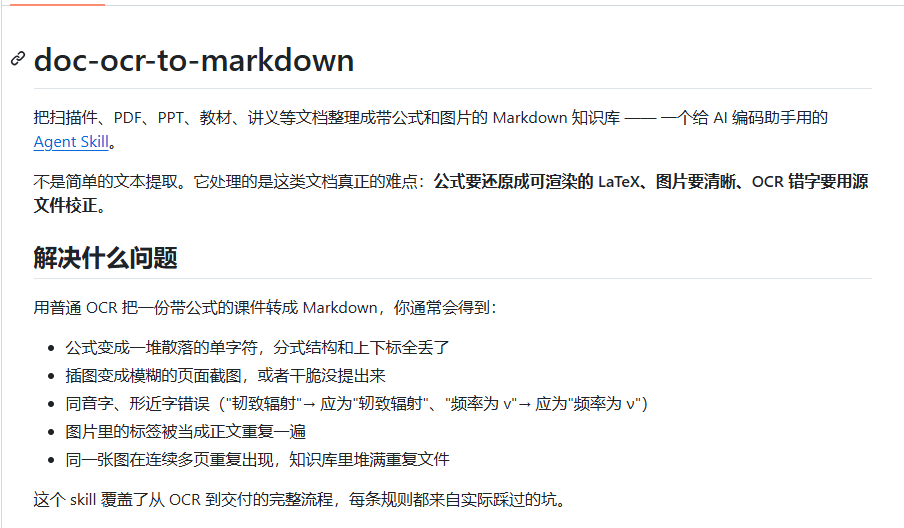
So, I created an open source Agent skill: doc-ocr-to-markdown
In order to completely solve this torturous process, I packaged all the pitfalls I have stepped into and all the alignment and cleaning scripts I wrote these days into an automated SKILL for large model Agents:
doc-ocr-to-markdown
The open source address is here (you are welcome to support it with Star):
In the past, you had to write a piece of Python yourself, install a bunch of dependencies, change a dozen regular expressions, and compare files manually. Now you only need to put the courseware or scanned document directory into the dialog box:
The Agent will automatically load this set of standardized skills and perform the entire set of work according to the industrial-grade assembly line without missing a step.
How does it "squeeze out and clean" the courseware?
At the bottom of this set of SKILL, I designed 6 extremely rigorous processes
1. Native HD image extraction + SHA1 intelligent deduplication
Many students don’t know,
.pptx file is essentially a zip compressed package, and all the pictures in it are stored in the original form. ppt/media/ directory.This set of SKILL is used when processing courseware:
- Page screenshots are absolutely not a priority! Instead, it directly extracts the original high-definition bitmap in the PPT container by parsing the page element level (the median is above 700px, and the highest is 1600px+);
- Only when encountering vector primitives that cannot be separated or purely scanned PDF, will it fall back to high DPI local cropping based on PDF vector rendering;
- All extracted images are calculated SHA1 content hash. In our actual testing, the whole set of courseware repeatedly appeared 264 illustration references, accurately deduplicated and compressed into 199 unique high-resolution images! The size of the knowledge base is instantly reduced, and there is no duplicate garbage.
2. Dual source alignment: use PPT native text to reversely correct OCR typos
This is an algorithm design that I find particularly interesting.
We have two pieces of data:
- PPT native text box: The text is 100% correct, but the formula is broken up;
- OCR results of MinerU: Formula recognition is very complete, but some rare words and professional terms are prone to typos.
We made a set in the script Dual alignment matching of spatial geometric overlap (Coverage) + text similarity (Similarity).
When it is found that an OCR text block and the native text box of PPT are at the same position on the page, and the overlap is greater than 0.5 and the similarity is greater than 0.9:
👉 Automatically replace OCR text with PPT’s native text!
Let’s take a real case: In the courseware of Chapter 1 X-ray Spectrum, the OCR model identified the professional vocabulary “fluorescence X-ray” as “fluorescence X-ray”. After the script matches the native text box, the edit distance similarity between the two is calculated to be as high as 0.982, which is directly and seamlessly corrected to the orthodox "fluorescence", while the following formulas and variable symbols remain intact.
Not only retains the original and correct words, but also uses the formula reduction ability of OCR in vain!
3. Eight LaTeX formula normalization rules to cure Obsidian obsessive-compulsive disorder
In order to make all formulas render 100% normally in Obsidian, I wrote a set of normalization processors specifically to deal with the defects of OCR formulas (
normalize_math.py), built-in 8 iron rules:- Chinese mandatory package: Chinese characters appearing in the formula will be stripped out
\mathrm, the specification converts to\text{...};
- Flatten nested syntax: Automatically eliminate images
\text{\text{中}}This OCR model occasionally suffers from hierarchical nesting;
- Convert full-width characters to half-width: Put the Chinese full-width brackets inside the formula
(), comma,Replace all with half-width to prevent brackets from crossing boundaries and being unable to be closed;
- Chinese characters for psoriasis before and after peeling off formula: Many formulas will have "In the formula:", "where" or a period stuck at the beginning, which will automatically switch back to the main text paragraph and give the formula a clean independent environment;
- Save cross-border broken brackets: For example, the text reads "(as shown in the picture )", OCR occasionally recognizes it as
\text{(in the picture } r_n ), resulting in half a bracket less in the text and half a bracket more in the formula. The script will automatically recognize this pattern and return the text brackets to their original owners;
- Old font macro normalization: will
{\rm hkl}、{\it abc}This obsolete TeX macro is uniformly replaced by the syntax supported by modern KaTeX;
- Deformulaize chapter titles: If the formula in the title is placed directly
$E=mc^2$, a bunch of backslashes will be displayed in Obsidian's outline directory and double-chain floating preview, and the script will automatically replace the title formula into plain text or Unicode symbols;
- Image Alt Tag Cleanup: Markdown image tag
The alt text in
is strictly prohibited from containing newlines, backslashes and braces, otherwise the entire Markdown image syntax will be paralyzed on the spot, which is also fully filtered and protected.
4. Completely strip away page numbers and impurities, and return to the true "continuous knowledge base"
This is a standard that I adhere to very much.
something made,It must be used as a teaching material for people and as a long-term memory for Agents..
All "Page 1 / 60 pages in total", "Courseware source: Material Analysis and Test Method_01", "Click to collapse the original slide"... these fragmentary thoughts have all been eliminated.
The chapter structure flows naturally according to standard third-level and fourth-level headings, and it reads like a carefully typed modern e-book.
5. Local automated three lines of defense quality inspection
How do you know if there are any leaks after doing it? Is there any formula that secretly reports an error?
This SKILL is equipped with a complete triple acceptance tool chain:
- Document structure audit (validate_output.py): Check the uniqueness of the H1 title, whether the titles at each level are skipped, whether the relative path of the picture actually exists and can be decoded by PIL, and whether the formula dollar signs are strictly paired;
- KaTeX full compilation verification (validate_math.cjs): Put the information in the knowledge base Extract all formulas without missing a beat, call the native KaTeX engine through Node.js to compile one by one (
throwOnError: true). One formula reported an error, and the entire script exited with a red light;
- Headless browser end-to-end rendering verification (preview_server.py): Start local service, load and render through headless browser, automatically assert the content of all images in the page
naturalWidth > 0, and.math-errorThe number of error elements is strictly 0!
694 pages of courseware test results
Let’s take a look at the real results of this set of skills in the entire ten-chapter “Material Analysis and Testing Methods” courseware for our materials major.
This is the final directory structure of the Obsidian knowledge base:
Measured statistical data:
- Original courseware scale: 10 PPTX files, total Page 694;
- Output the number of text characters: 241,001 characters;
- Extract the total number of formulas: 2,118 places(including 339 independent block-level displayed formulas and 1,779 inline embedded formulas);
- KaTeX full compilation pass rate: 2,118 / 2,118 All passed (100% pass rate, 0 errors!);
- High-definition illustrations and charts: After extraction and deduplication 199 HD pictures、36 standardized Markdown tables;
- Total storage volume: Including all high-definition images, the entire knowledge base only 24 MB.
Let me show you the real Markdown effects exported in two paragraphs.
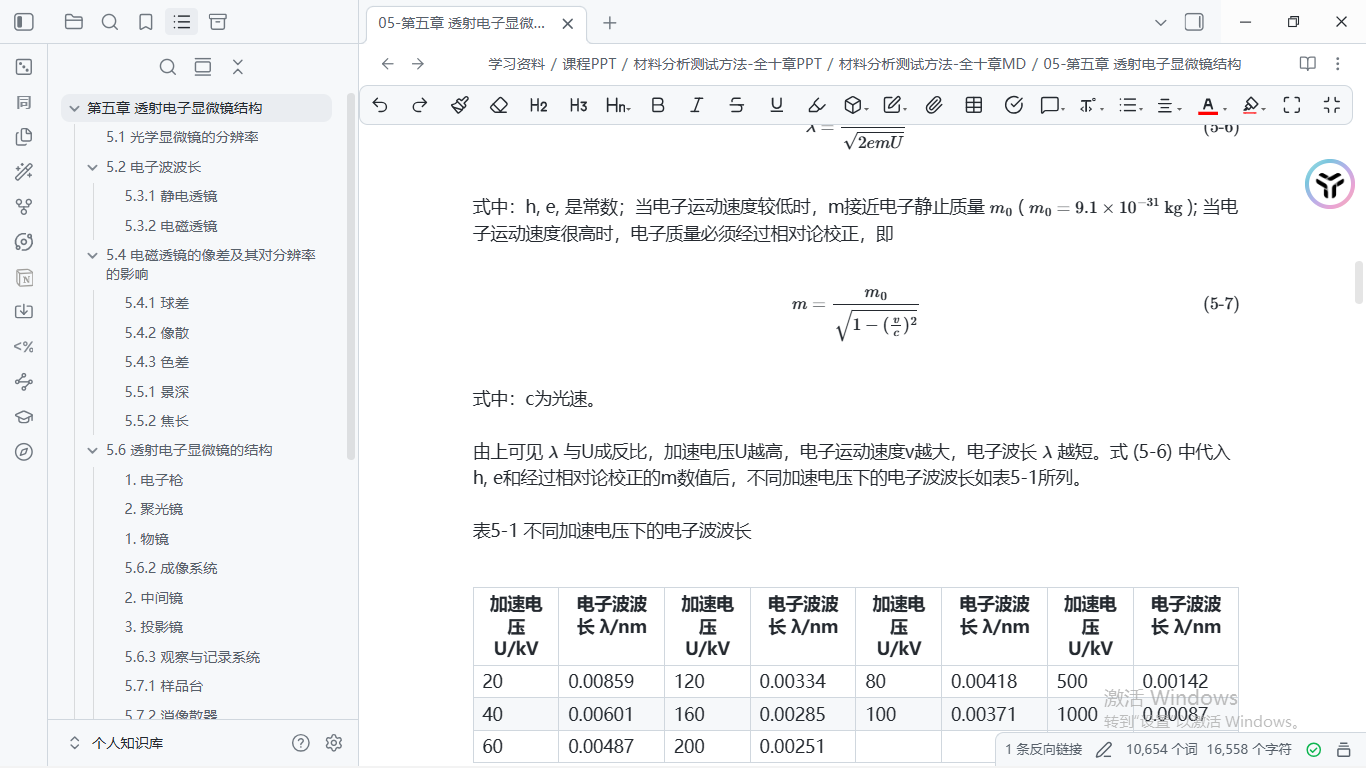
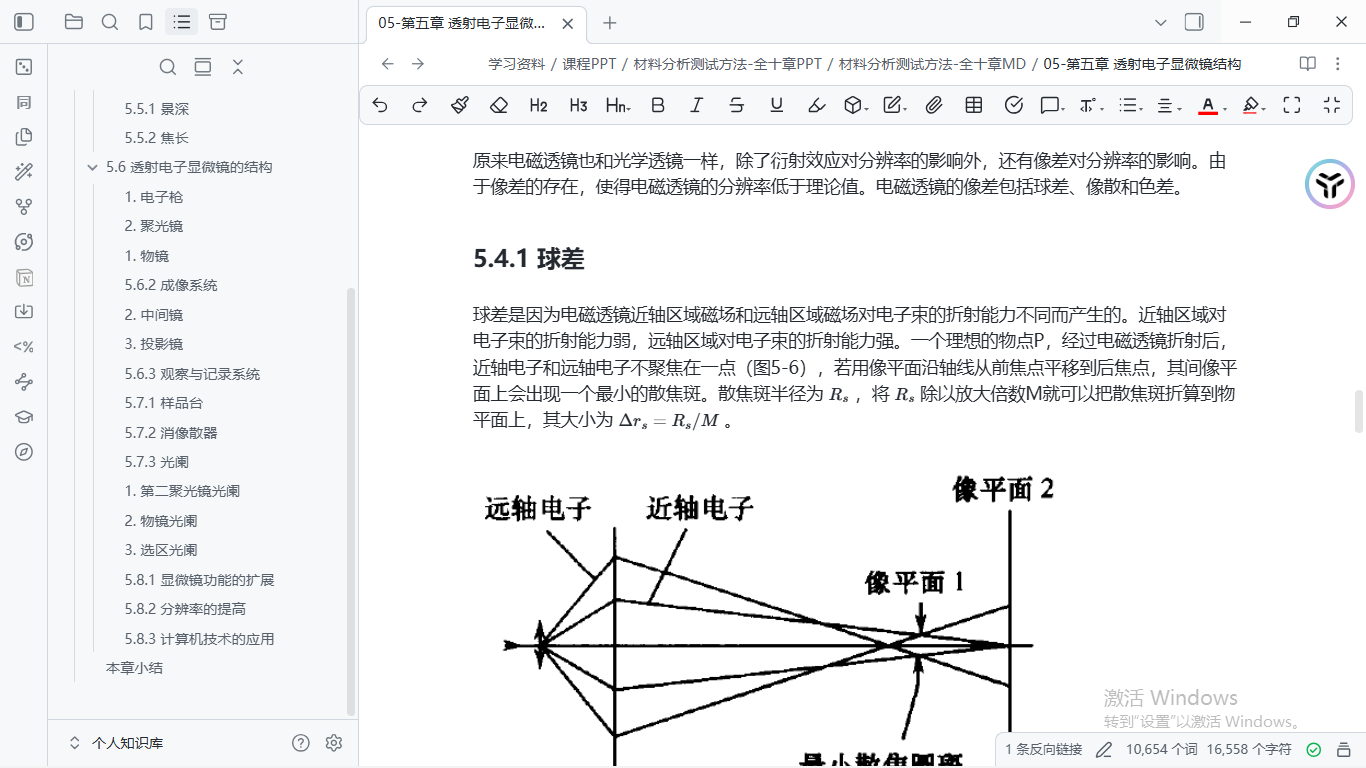
After hanging this set of notes on the Agent, when I asked it: "Help me compare the objective lens diaphragm operation mode and imaging contrast source of the bright field image, dark field image and high-resolution image", the Agent could accurately call the original image, formula and derivation details of Figure 7-1 within a few seconds, and give an accurate answer without illusions!
Development bug: MinerU agent Fake-IP
When developing this workflow, there was a small bug
When we call MinerU's cloud API in batches, everything is normal when submitting tasks and querying status.Download the ZIP package of the final analysis results link, Python
requests and systematic curl Crazy error:I was completely confused at that time: the same script, the first two steps of the API can be accessed, why only this domain name for downloading CDN files (
cdn-mineru.openxlab.org.cn) Can’t even complete the handshake?After further investigation, I discovered the culprit: many friends had local network proxy software (such as Clash / Sing-box, etc.) enabled, and turned on TUN mode or global mode. Under these modes, some domestic CDN domain names are taken over by proxy clients and a
198.18.0.x of Fake-IP (reserve the test network segment).When our request brought the real SNI to connect to this virtual IP, the handshake protocols on both sides did not match, and the connection was cut off on the spot!
Some students, trying to save trouble, may take a wild approach: just add
-k(turn off SSL certificate verification), or forcibly turn off the global proxy.But I personally dislike this approach very much:Turning off certificate verification not only poses a huge security risk, but also frequently switches the system network environment in order to run a document parsing, and the experience is extremely bad..
Finally I was downloading the script (
mineru_ocr.py) has a very clever mechanism:
The script will pass the public DoH service (such as Alibaba DNS https://dns.alidns.com/resolve) Directly go to the public network to query the real physical IP of the CDN domain name, and then use curl --resolve cdn-mineru.openxlab.org.cn:443:realIP Establish a direct connection channel!So:
- There is no need to use any proxy software on your computer.;
- 100% preservation of system TLS/SSL certificate chain verification, never turn off security protection;
- Pull back the result package steadily and quickly.
This small function has also been open sourced in the warehouse along with the code. If you usually write crawlers or call cloud services and have encountered weird metaphysical problems similar to CDN handshake EOF, you may wish to refer to this solution.
How to use?
This set of tools is completely open source on GitHub, and its use is very flexible and easy to use.
Method 1: Call directly as Agent SKILL (recommended)
If you daily use AI Agent tools that support SKILL extensions (such as Claude Code, Codex, ZCode, etc.), you can directly clone this repository to your skills directory:
After the installation is complete, just speak directly in the session:
Agent will automatically help you check dependencies, upload MinerU, download results, align and correct, assemble Markdown, and perform full KaTeX verification.
Method 2: Run the Python script directly in the terminal
If you are used to running scripts by yourself, the tool chain in the warehouse can also be executed independently from the Agent:
- Install environment dependencies:
- Configure MinerU API Token: Set your environment variables in the terminal (available in mineru.net Free application):
- Complete the conversion in three steps:
The last, the last
From initially writing a small script for Obsidian in May, to making a complete document translation tool PaperLoom during the National Day, and then to opening this open source today
doc-ocr-to-markdown Skills.Looking back, the starting point for most of the tools I make is very simple:It is to solve the real pain that I, as an ordinary science and engineering student, experience when reading literature, chewing on courseware, and building a knowledge base..
Technology updates and iterations are really fast, from MCP and Plugin to Agent SKILL, which increasingly emphasizes closed loops.
But no matter how the tools change, the core purpose remains the same——Leave the tedious, repetitive, and dirty work of format conversion to the machine, and leave the coherent, focused, and curious thinking to ourselves..
If you are stuck with hundreds of endless pages of professional courseware, scanned textbooks, or large lecture notes, you might as well try this skill and give your Obsidian knowledge base a non-destructive overhaul.
If you encounter any bugs or have suggestions for improvements during use, please feel free to raise an issue on GitHub:
If you think it is helpful, please click on it. Star is the biggest encouragement to me, a college student who stays up late to write code!
The above is the entire content of this issue!
I am Sanmu, a college student who loves vibe coding and vibe research.
See you next time, Ghana~ 👋
- Author:Sanmu
- URL:https://luffysite.top/article/doc-ocr-to-markdown-skill
- Copyright:All articles in this blog, except for special statements, adopt BY-NC-SA agreement. Please indicate the source!
Relate Posts
From Zotero to Obsidian: Turn Papers into Linked Notes with One Skill
Connect Codex to DeepSeek: A Zotero and Obsidian Research Workflow

ZotFlow: Connect Obsidian and Zotero in Both Directions

Sync Obsidian Notes to Notion

My Obsidian Web Clipper Templates

A Complete Setup Guide for PDFMathTranslate and pdf2zh