Here's the thing.
I usually read an English paper. The process is roughly like this. I first find it in Zotero, drag the PDF into the translation tool, wait until it is finished, then open it and compare it. When I get halfway through it, I want to take note of something, so I go to Obsidian and create a new note, and copy the title, author, and DOI one by one.
Four windows, switch back and forth.
One or two articles were okay, but when the number of documents increased, I was really a little bit broken. . .
I have written a tutorial on the configuration of PDFMathTranslate and pdf2zh before. At that time, I really recommended it. It is free and open source, and the editable PDF can be translated and formatted well. I still think it is a good tool.
But if you use it for a long time, you will hit two walls.
One wall is Scanned version. Older papers and PDFs scanned from libraries are just pictures without text layers, so tools like these are basically useless.
Another block is Inline formula. The small formulas included in the text, a subscripted variable or a fraction, are often broken into pieces after translation, and the context does not match up. Friends who major in science and engineering should understand this kind of pain. This kind of thing is everywhere in a paper.
I have also made several small tools in the past. One is the MinerU Parser plug-in that calls MinerU to parse documents by right-clicking in Obsidian, and the other is the Codex desktop plug-in that connects Zotero, MinerU and Obsidian. Each of them solved a problem, but the translation link has always been empty, and the four windows are still four windows.
So this National Day holiday, I simply made a complete desktop application.
It's called PaperLoom.
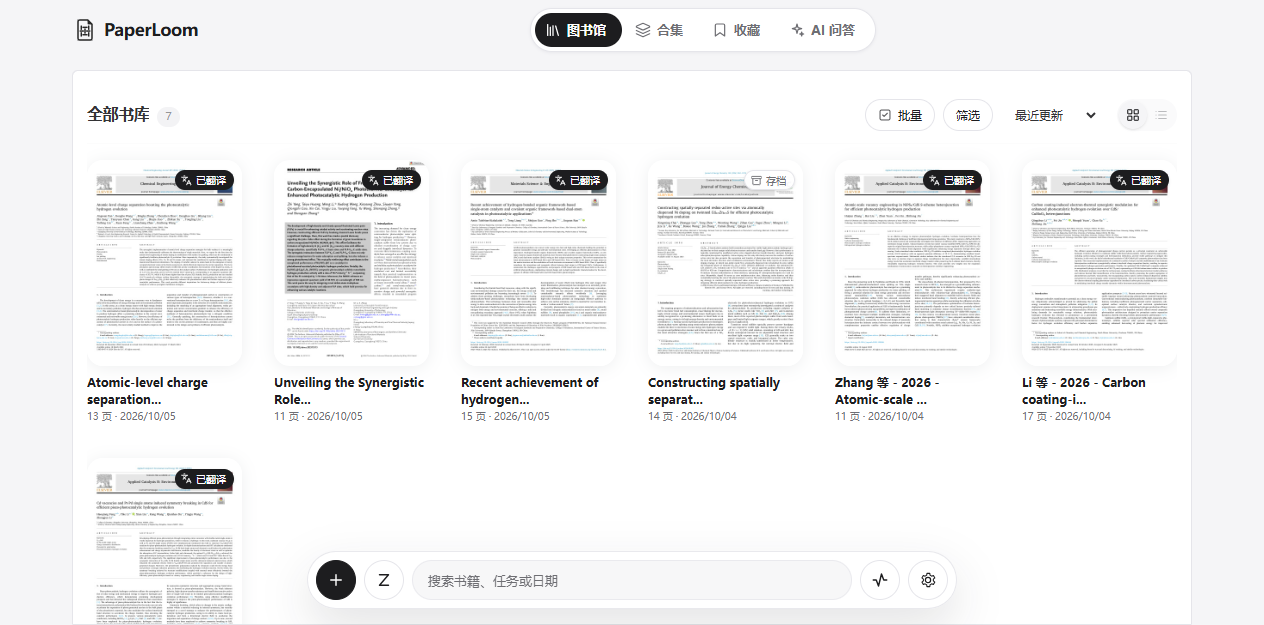
The project address is here
Let me tell you the truth first.PaperLoom was not written by me from scratch.. It is developed based on the open source RetainPDF (MIT protocol) of wxyhgk on GitHub. The foundation of PDF processing, translation and typesetting was laid by the original author. On this basis, I continued to work on document management, reading experience, linkage between Zotero and Obsidian, and polishing of the desktop.
The data and ports of the two projects do not interfere with each other, and they will not fight if they are installed on the same computer.
I would like to sincerely thank the original author. Without RetainPDF, there would be no such thing as it is today.
Where was the 500 yuan spent?
Let me explain the 500 yuan in the title clearly to everyone first.
This money Not a penny was spent on buying software, it was all Vibe Coding’s API fee.. The one in the screenshot is Claude Opus 5.5 from the transfer station. Throughout the National Day, I basically put forward requirements, tested the effects, and found faults. The code was written by AI. After writing, I tested it again. If it was not correct, I revised it, and polished it round by round.
I also said in my previous article that I don’t know much about programming, so this project is said to be done by me. In fact, it is more like me being the boss and AI being the employee.
Now, this is a consumption record.
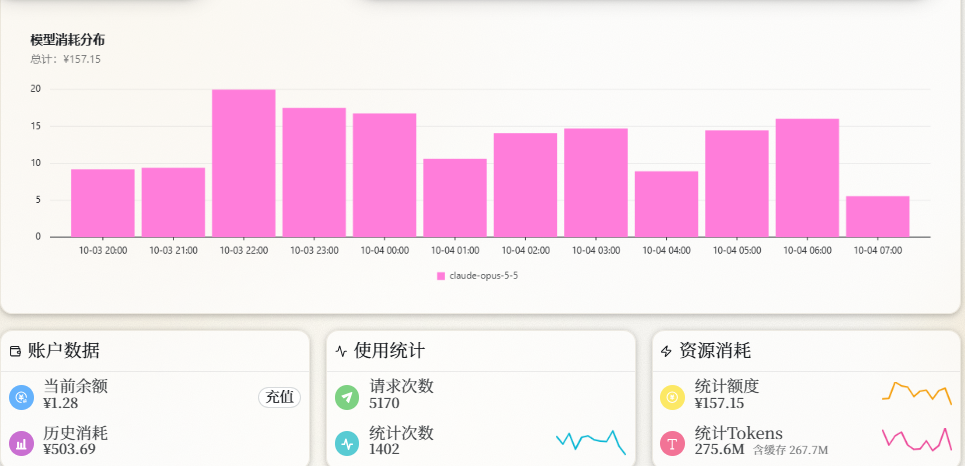
Historical consumption 503.69 yuan, the remaining balance is 1.28 yuan, the number of requests 5170 times.
The histogram above is the consumption from 8 pm on October 3 to 7 am the next morning. This period alone cost more than 157 yuan, without stopping every hour. . . Believe it or not, my National Day schedule was distorted by a PDF translation tool.
There is also an interesting number. According to statistics, the total number of Tokens is 275.6M, of which There are 267.7M cache hits, accounting for almost 97%.
Why is the cache so high? During Vibe Coding, the AI has to re-read the project code and previous conversations in each round. Most of the content is actually repeated, and the parts that hit the cache are billed much cheaper. Without caching, this bill would have doubled several times, which scares me just thinking about it.
But it must be made clear here,500 yuan is my development cost. You don’t need to spend this money to download and use it.. You only need to pay for the OCR and translation model API you use, which will be discussed later.
What on earth is it turning over?
The core capability of PaperLoom is Translate PDF while retaining the layout.
Editable PDFs can be translated, as can image and scanned versions. Multi-column text, pictures, tables, and complex formulas basically stay in their original positions after flipping through them.
The scanned version needs to go through OCR first. You can choose MinerU or PaddleOCR to recognize the text, formulas, and tables in the picture, then give it to the model for translation, and finally put it back in the original format.
There is a detail here that is easily overlooked, but I think it is quite important.
Many PDF translations are done text box by box, which sounds fine, right? However, a sentence in the paper is often split between two columns, or spans a page. If the text is translated box by box, the model will only get half a sentence each time. Naturally, the preface does not match the postscript.
PaperLoom will first restore cross-column, cross-page, and broken sentences to their complete semantics before handing them over to the model.
Users usually don’t feel this step, but the difference lies in whether it reads smoothly or not.
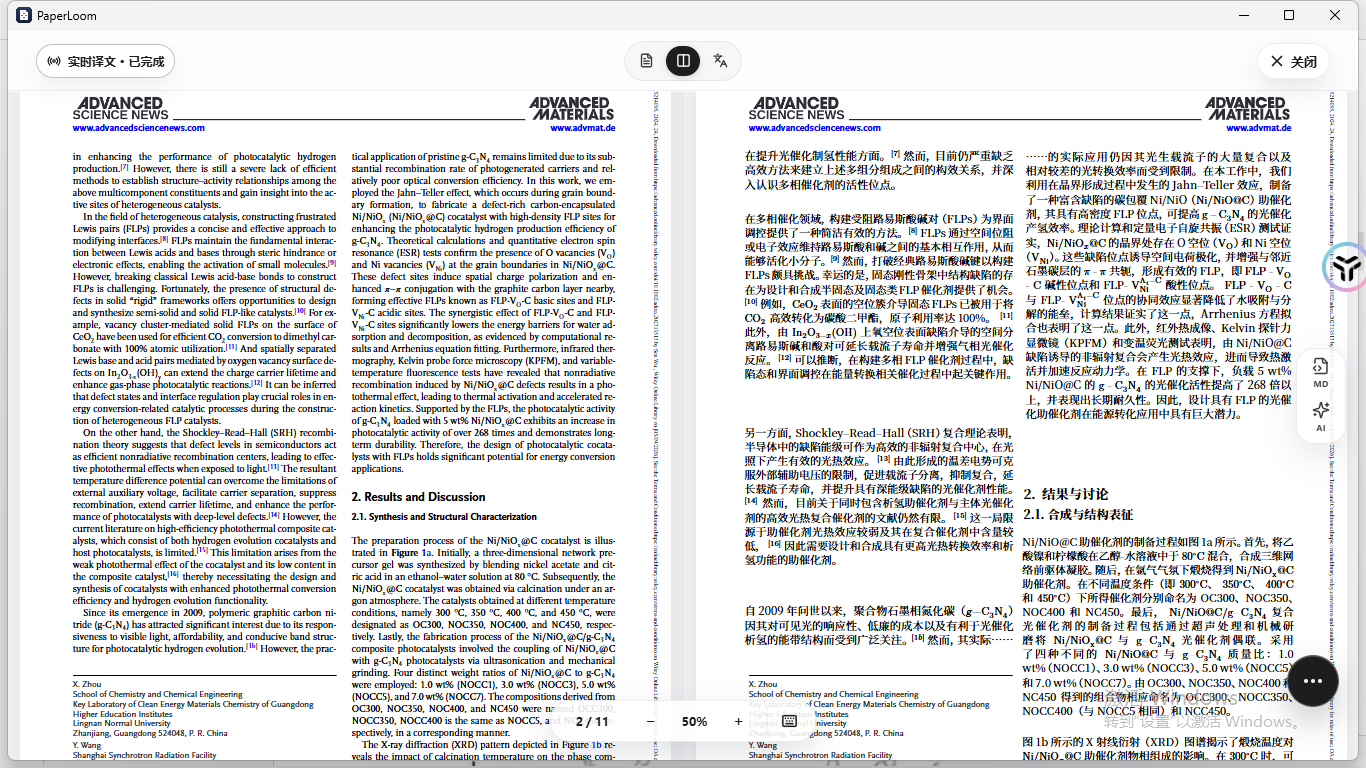
Then there is the part I want to talk about most, inline formulas.
That wall at the beginning was also my biggest headache at first, but now it has become PaperLoom’s best feature. After translation, the ontology of the formula, its relationship with the surrounding context, and the layout within the lines can be retained relatively stably.
I have looked through open source PDF translation projects myself, and I have yet to find another one that can achieve this level of both scanned versions and inline formulas. Of course, it may be that I haven't found everything. Friends who know are welcome to tell me.
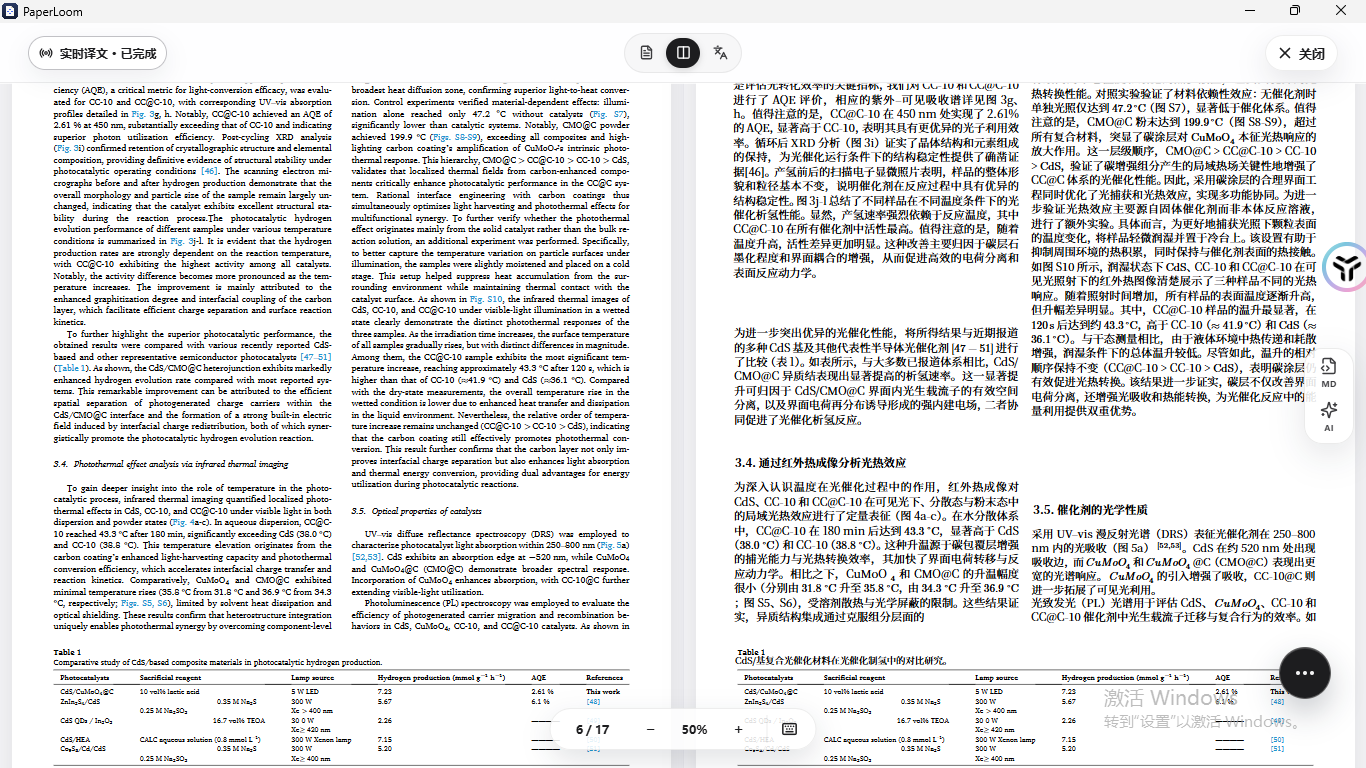
The same is true for pages with many charts. The combination chart is still in its original position, and the legend has been changed to Chinese.
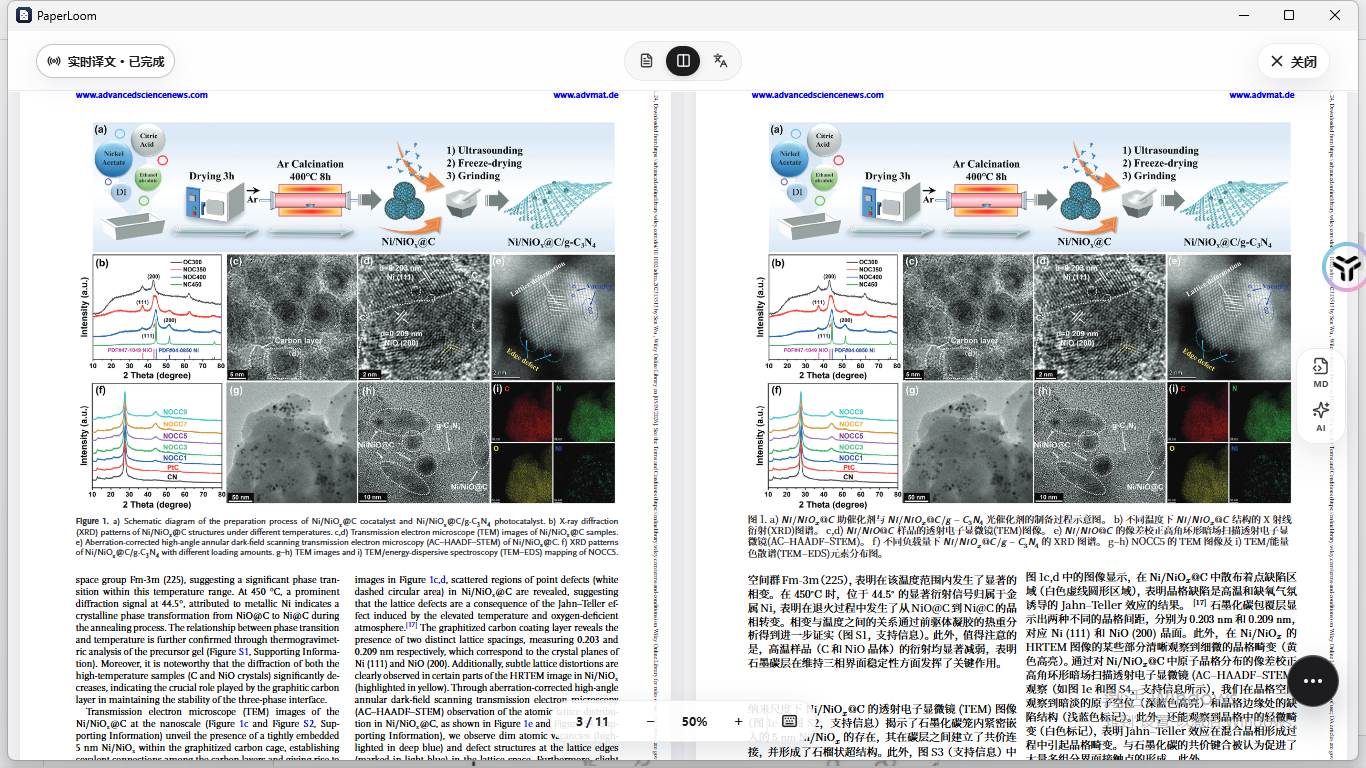
In addition, there are several small functions, which may sound inconspicuous, but they are really useful when reading papers.
The code will not be accidentally translated, and the code snippets attached to the paper will remain intact. You can turn the table on or off by yourself. Sometimes the table remains in English, which makes it more convenient to check the data. You can also add a glossary and customized translation strategy, so that certain professional words can be translated according to the customary name of your research group, so that each article will not be translated differently.
I made a rough comparison with several common tools based on the items I care about. The standards are relatively rough and only represent my own experience of using them. Knowledgeable friends are welcome to criticize.
- Scanned PDF: Doc2X and PaperLoom can pass, but PDFMathTranslate and PolyglotPDF are basically useless.
- Complex inline formulas: The same is Doc2X and PaperLoom, PaperLoom is more reserved.
- Code translation is correct: Only PaperLoom, the other three will turn over the code snippets together.
- Can the table be turned over?: Only PaperLoom can switch on and off by itself, Doc2X is barely average.
- Glossary and translation strategies: Only PaperLoom can be configured according to rules
- Typesetting preserved: Doc2X and PaperLoom are strong, the other two are average
- API open: In addition to Doc2X, all
To be fair here, Doc2X is actually quite powerful in terms of scan version and formulas, but it does not open the API and points cost money. I have also complained about this in my previous article.
After you finish reading, you can start reading the paper.
Translation is only the first step. PaperLoom is actually more like a workbench for reading literature.
The imported documents will remain in the library, and collections can be created and added to collections. On the details page of each document, you can see the progress of OCR, translation, and rendering. You can tell where you are stuck at a glance, without having to wait in circles.
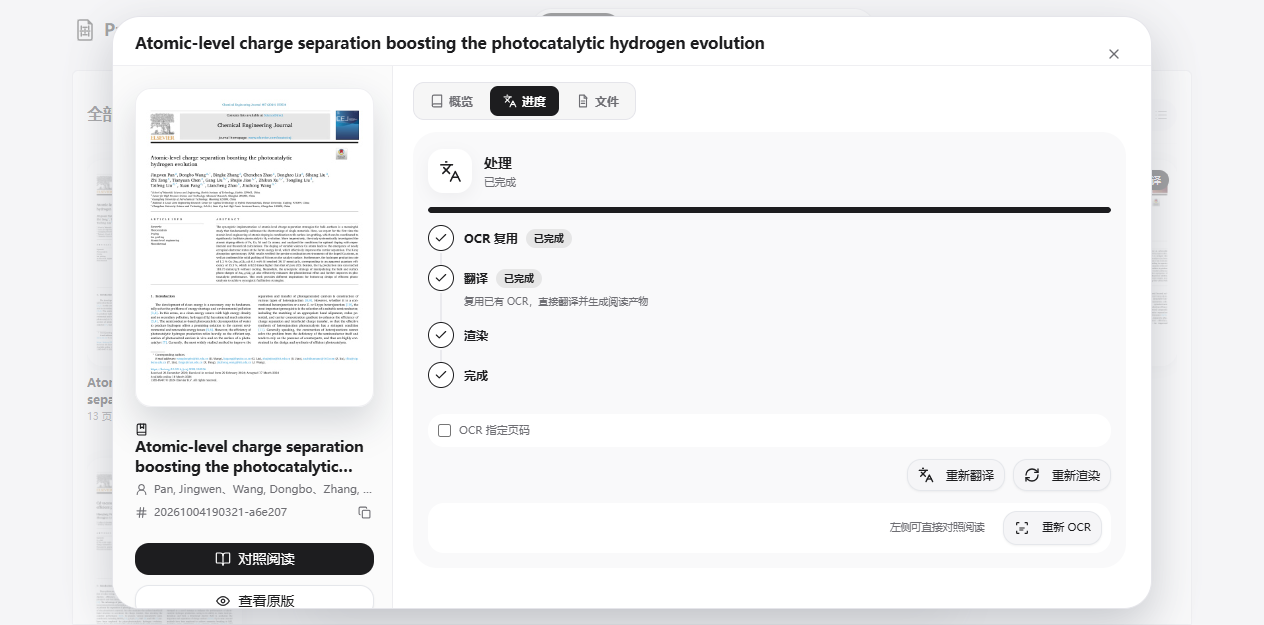
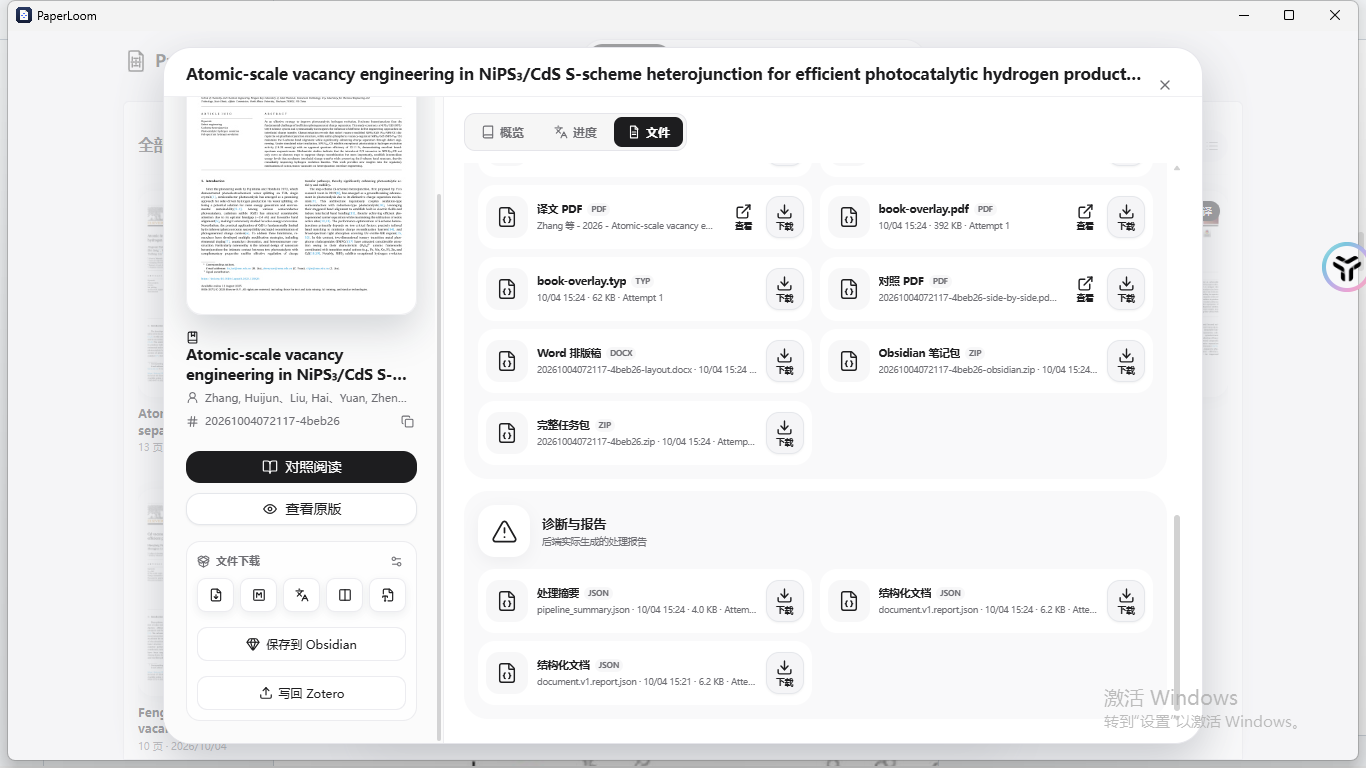
After browsing, the details page will put the products together, including translation PDF, comparison PDF, Word typesetting draft, and Obsidian note package. Download whichever one you want.
When reading, the original English text and Chinese translation are side by side on the same page. It is much easier to check terms, formulas, charts and references. You can also read only the original text or only the translation.
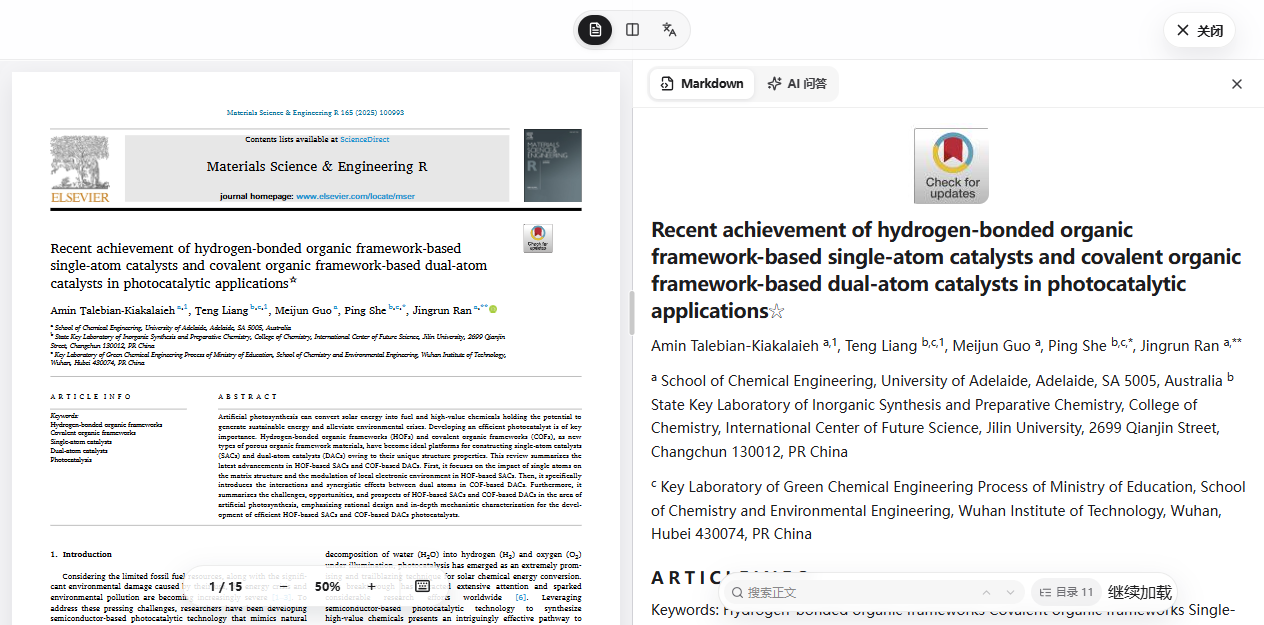
When you need to copy or retrieve text, you can open the Markdown panel and view it together with the original PDF. Formulas and pictures will be displayed along with the text. Long text is also loaded on demand and will not get stuck as soon as it is opened.
I want to say a few more words about this, because the sentence in the title about Markdown formula rendering is what it is about.
In the Markdown exported by some tools, the formula will be turned into a picture, which looks fine, but when copied, it cannot be changed or searched.The formulas exported by PaperLoom are standard LaTeX writing methods, inline formulas are wrapped with a single dollar sign, and independent formulas are wrapped with two. Editors such as Obsidian and Typora can render them directly.
Let me show you a real export result. I translated it from the Pan 2024 paper on photocatalytic hydrogen production. The following is the original content in the Markdown source code.
You see, the element symbols, percent signs, and units included in the Chinese translation are all still the formula itself, and have not been translated into Chinese or dismantled. In this translation,There are more than 300 inline formulas, if I manually fix it one by one, I will really go crazy.
I dare not say that it is necessarily the best, but as far as I have used it during this period, I have not found a more worry-free solution for the combination of PDF translation and typesetting and Markdown formula. You can also try the paper with the most formulas in your hand. After reading it, open Markdown and you will know it at a glance.
One level up, there is document AI.
You can ask it directly, what is the method of this paper, what page is this number on, and help me explain this formula. Its answers will include document references. Clicking on the reference will return you to the page number corresponding to the original text, and you can also preview page thumbnails and excerpts of the original text.
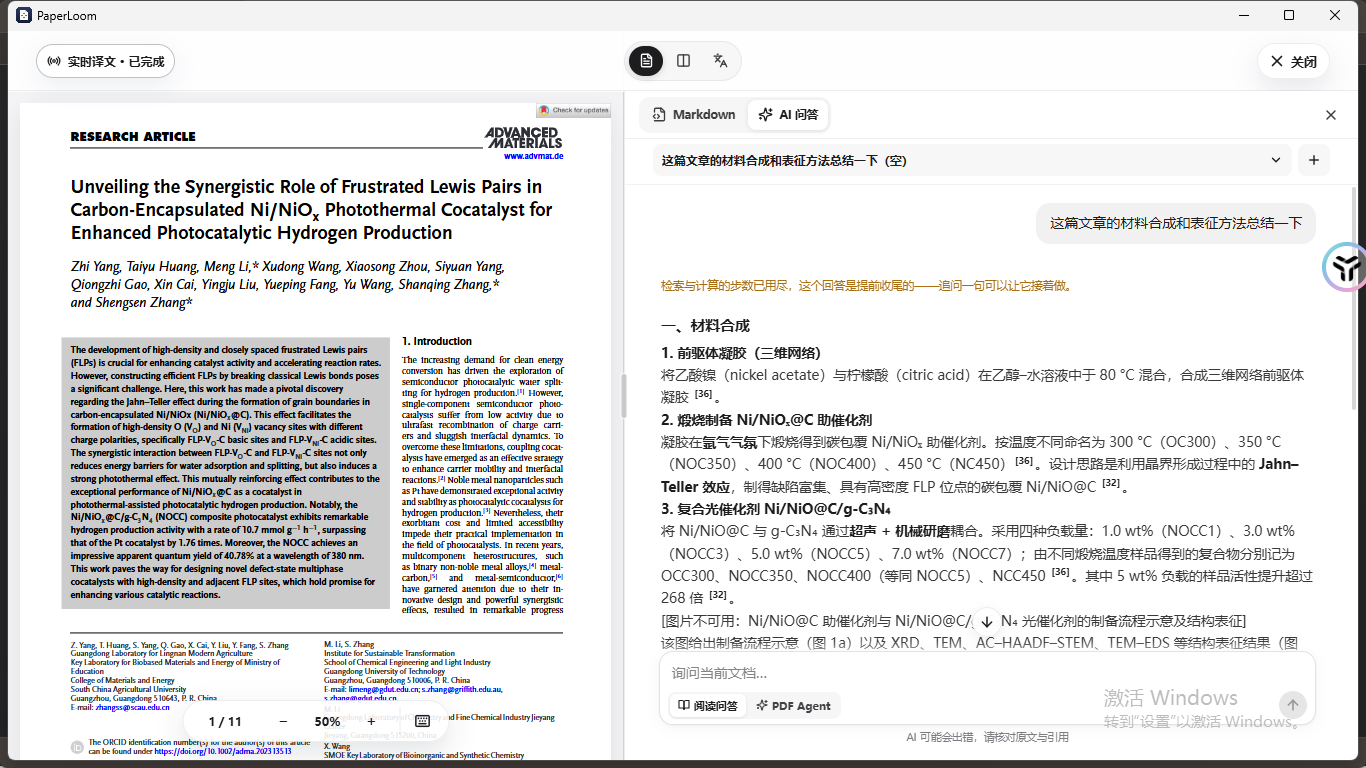
In the screenshot, this time, I asked him to organize the synthesis steps and characterization methods of a material paper. They were listed separately, and each item was followed by a citation. Click on the quote and you can see which page and paragraph it was found from.
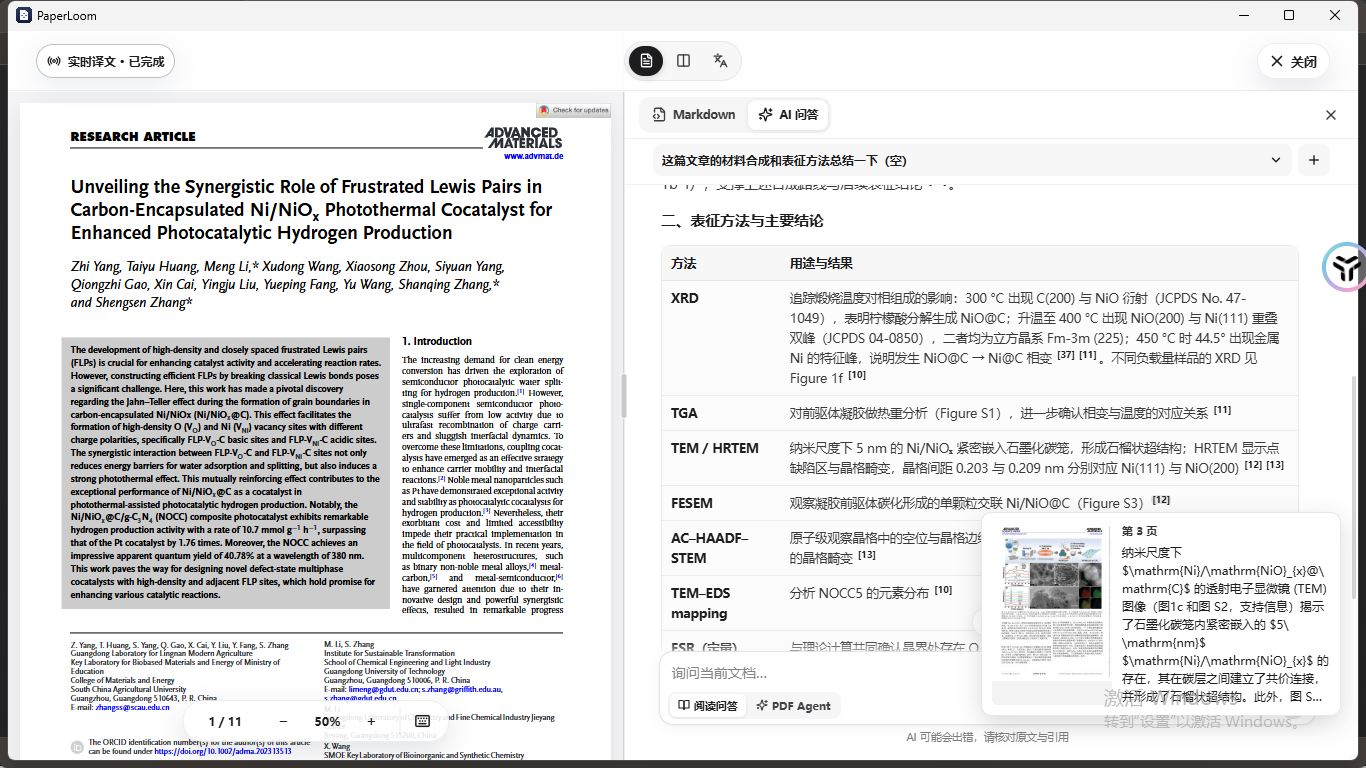
There is also a PDF Agent that can perform some operations on documents, but each step requires your explicit authorization, and it will not secretly move your files on its own.
Zotero and Obsidian are the parts I want most
If you also use Zotero to manage documents, you should know the feeling. The documents are in Zotero, the translations are in a download folder, and the notes are in Obsidian. Over time, no one can match the other.
PaperLoom does this more thoroughly.
Let’s talk about Zotero first. In PaperLoom, you can directly browse your Zotero library and categories, check PDF batch import, and start translation immediately after importing. It should be noted here that the PDF in Zotero must be downloaded locally first.
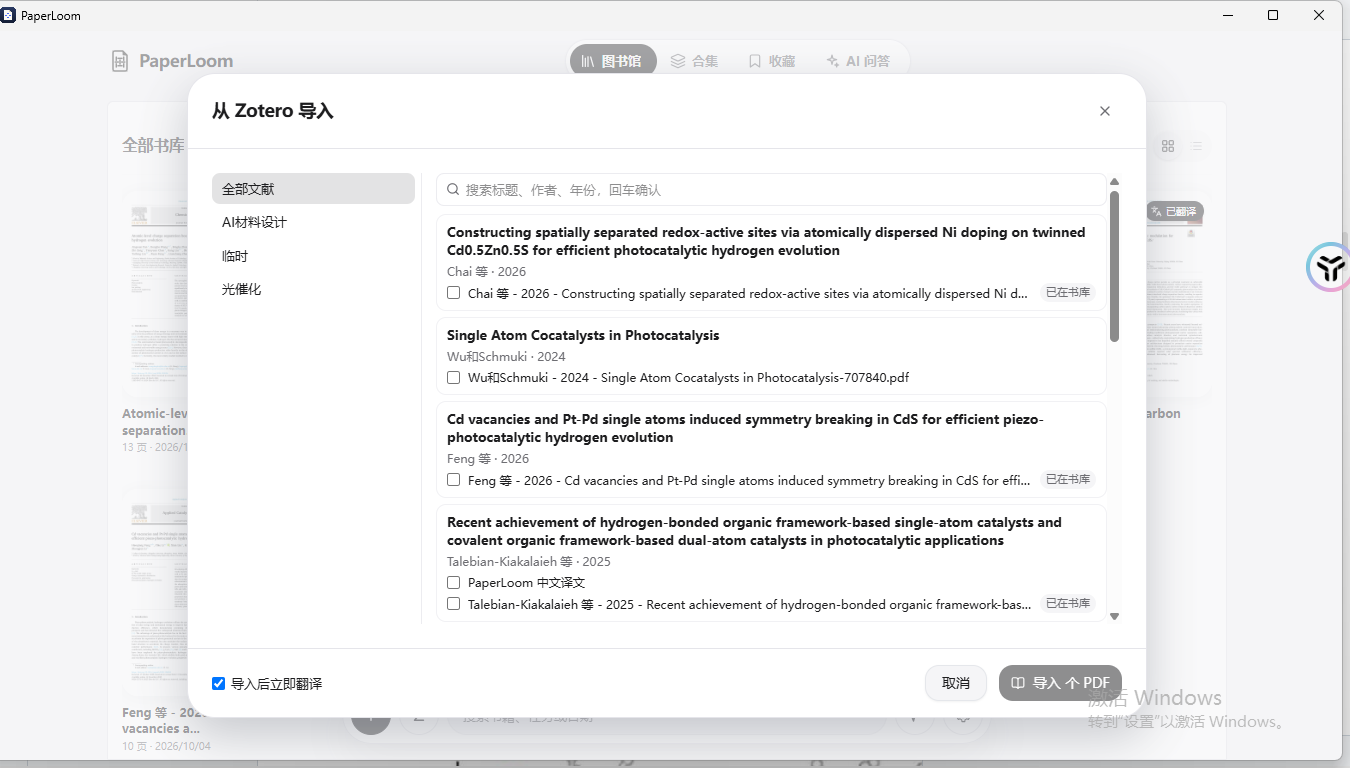
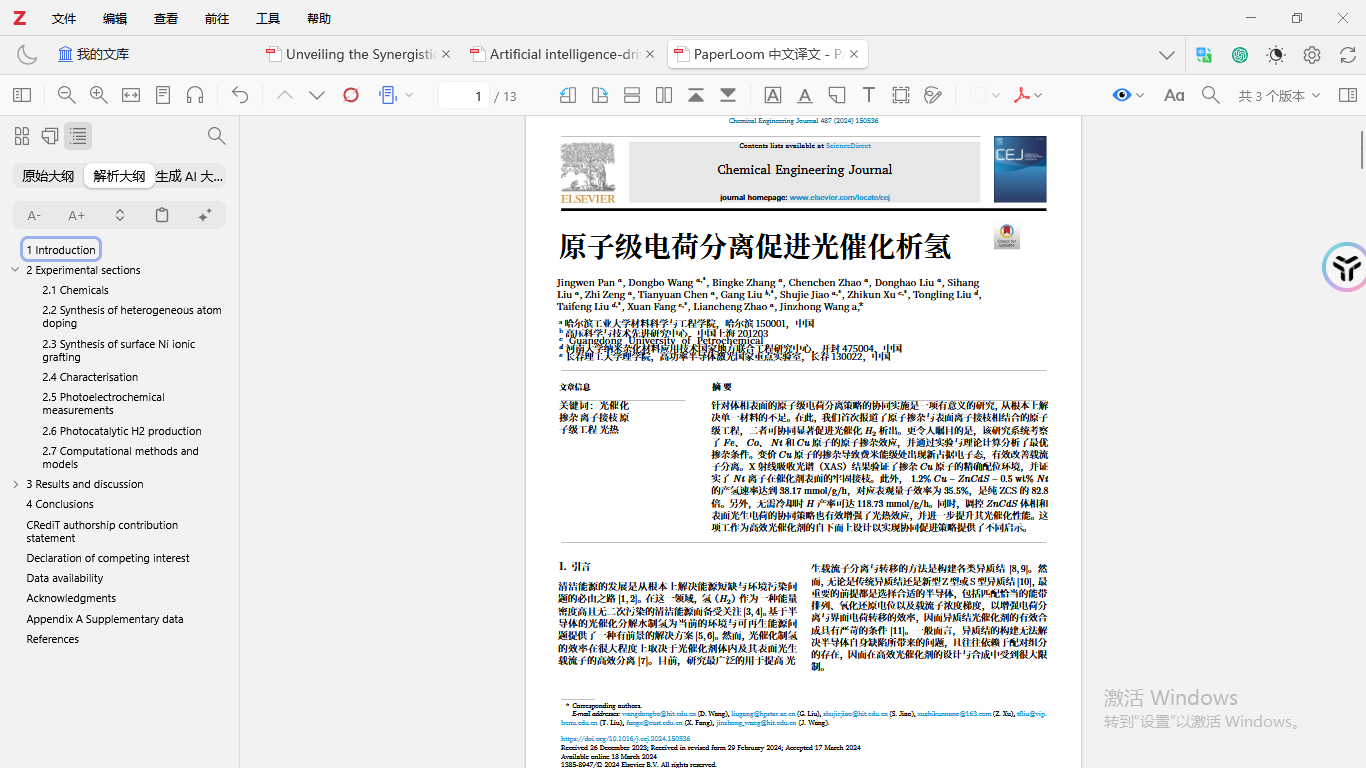
After you have finished translating, you can write the translation back to Zotero.
The translation will be used as a PDF sub-attachment called "PaperLoom Chinese Translation", hung below the original document, and can be opened directly in Zotero's built-in reader. If you write back repeatedly,The updated attachment is still the same, and there will be no more piles..
Batch writeback is also supported, with multiple selections in the library, up to 200 articles at a time. Whether each article is new, updated or failed will be listed one by one. The failure of one article will not affect the continued running of others. The picture below is the result of me writing back 3 articles, updating 3 articles, and failing 0 articles.
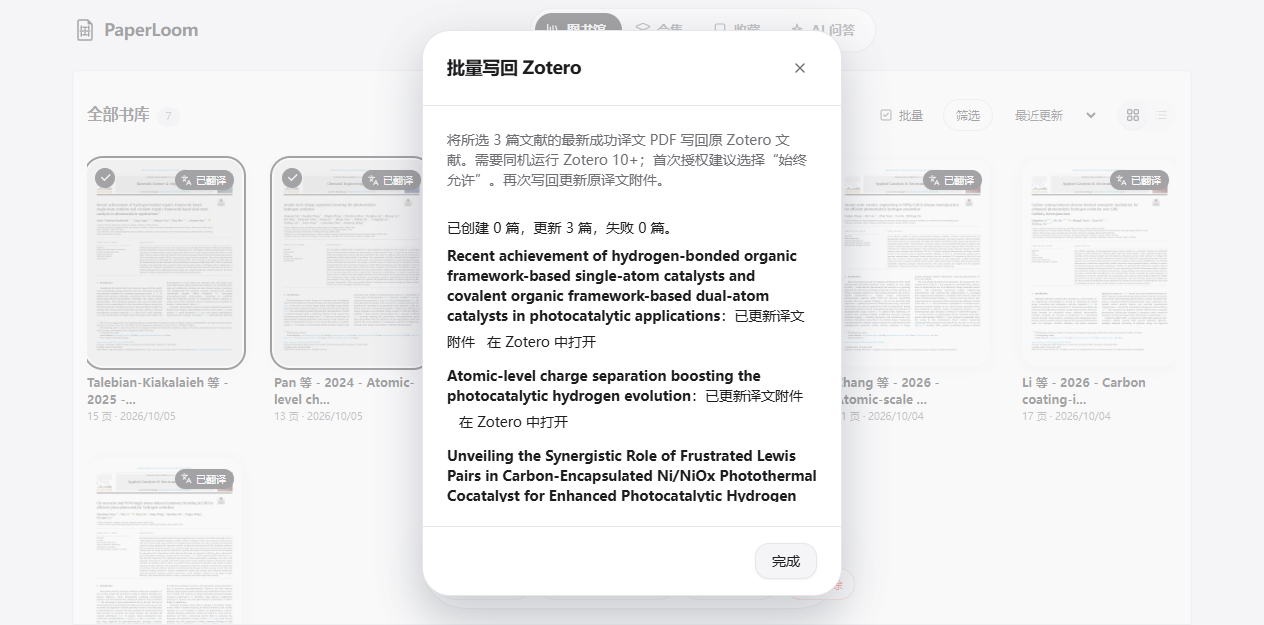
Another thing I care about is that PaperLoom does not directly change Zotero's database file zotero.sqlite, but uses Zotero's own open local interface. So Writeback functionality requires Zotero 10 and above, Zotero 9 and below can only be imported.
Let’s talk about Obsidian.
Select multiple documents in the library, click Save to Obsidian, and select the vault and directory. The same batch can contain up to 200 articles. You can export Chinese notes, or you can also export the original notes. The translated PDFs and pictures will be put into the matching resource directory.
In the frontmatter of each note, there are title, author, year, DOI, journal, and Zotero links, as well as links that can jump back to the corresponding documents and tasks in PaperLoom. There is double-chain communication between the original text notes and the translation notes.
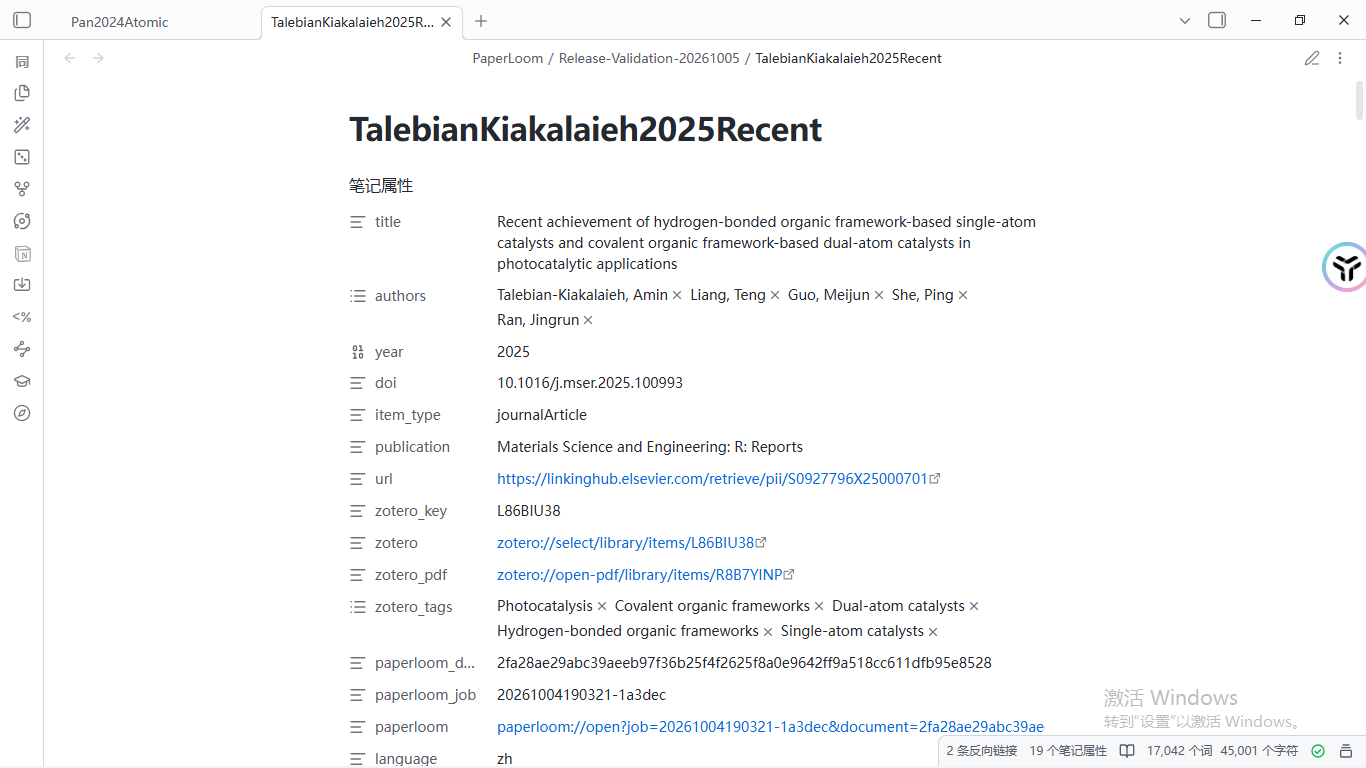
Open the note. The translation PDF is embedded at the top, and the Chinese title and text are below. The formulas and pictures are all in the text, which is the same set of things seen in PaperLoom.
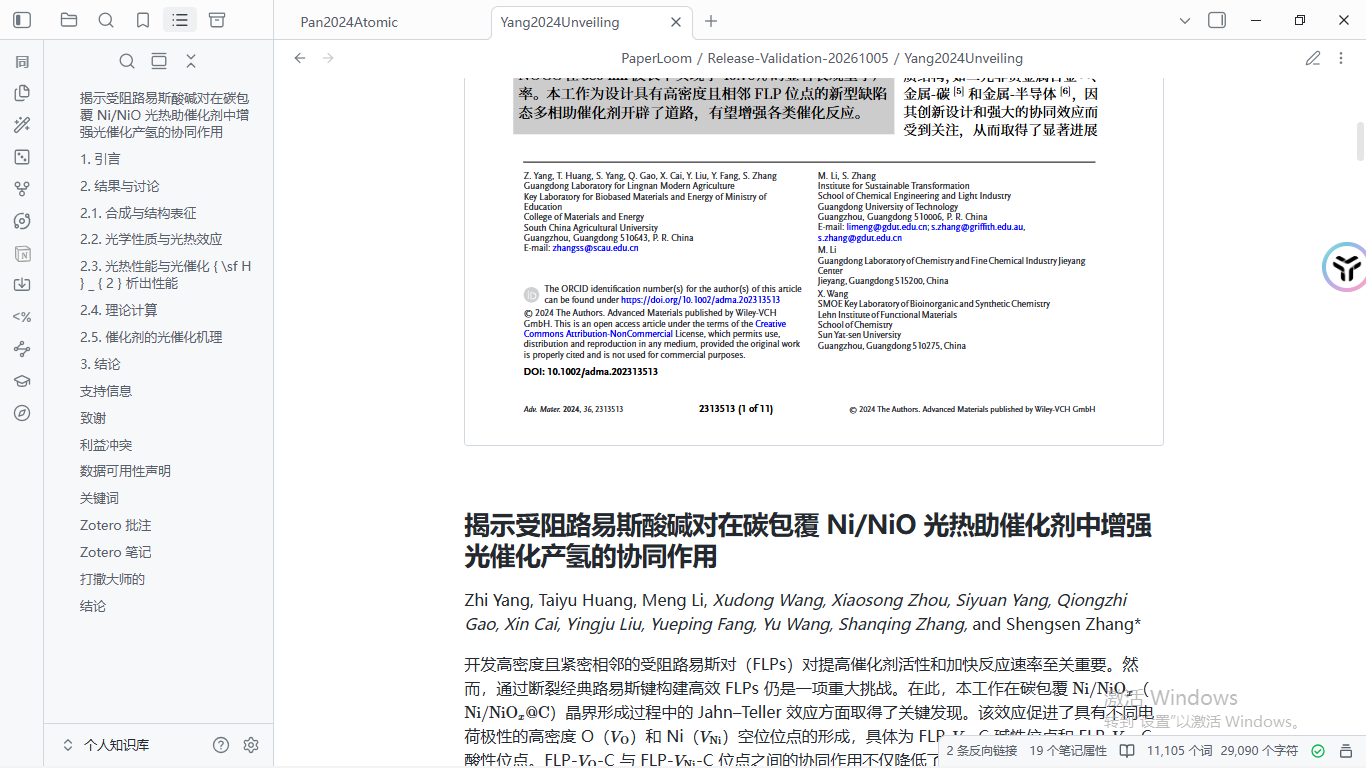
Complex tables preserve HTML and merged cells. The formulas in the table can be rendered by installing the Obsidian community plug-in HTML Table Math. This is optional, and ordinary text and notes can be viewed normally without it.
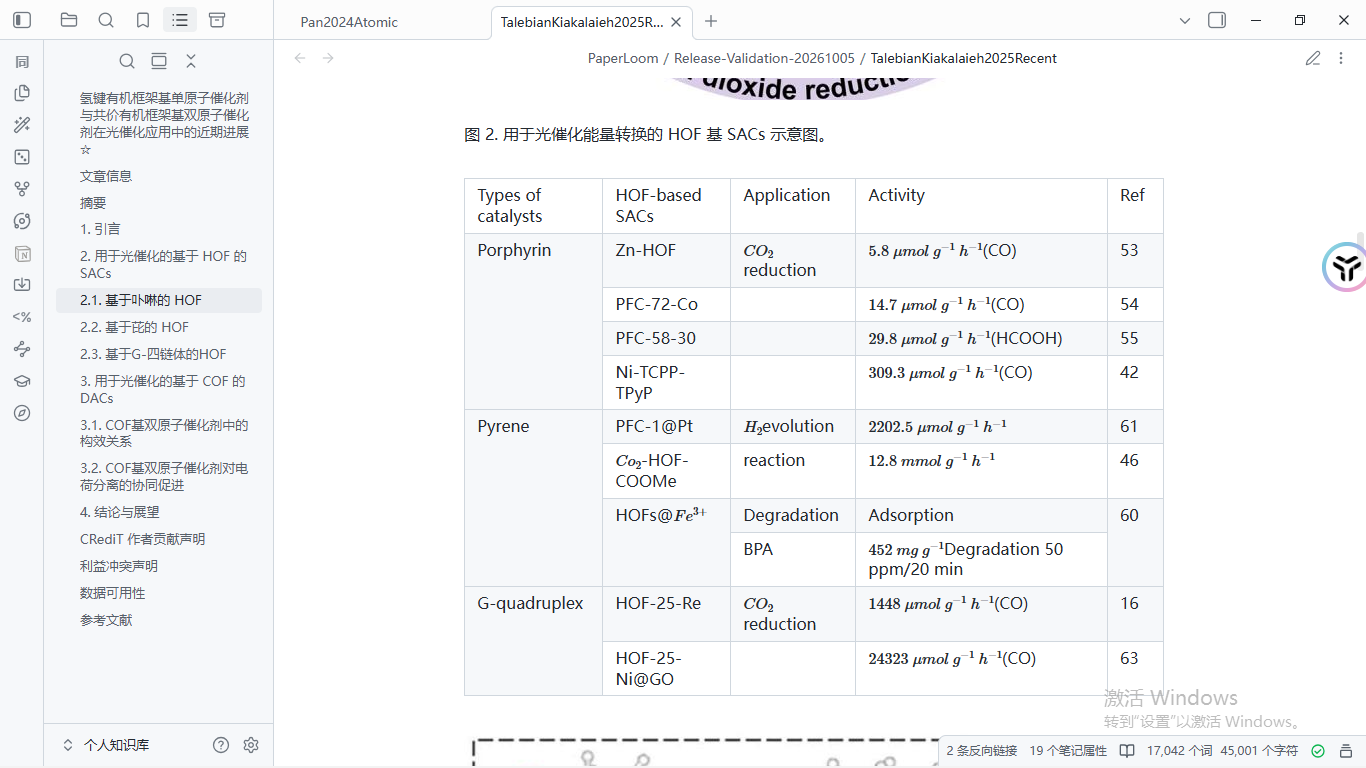
What surprised me the most was,The highlights, comments and sub-notes you have made in Zotero will also be brought to Obsidian, the annotation also retains the page number and the link located in Zotero. Clicking it will jump back to the page in Zotero.
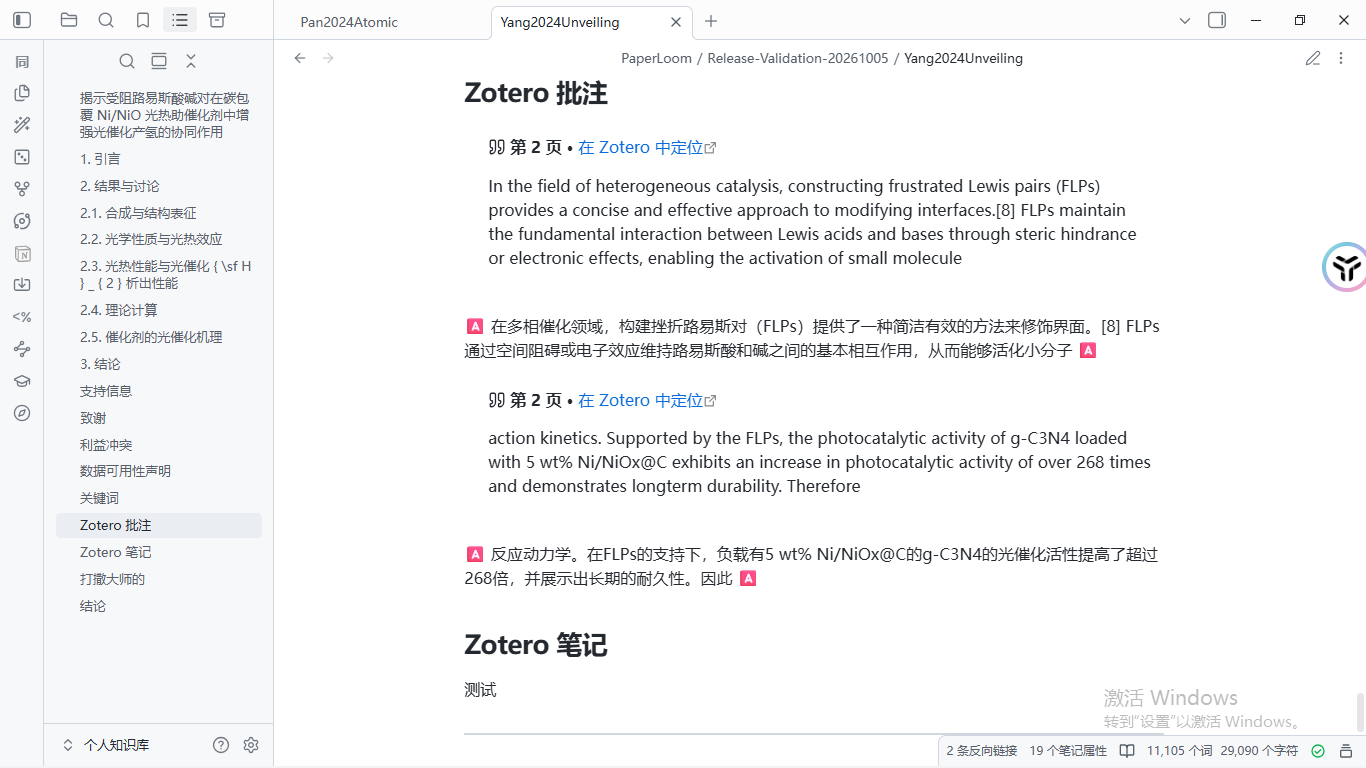
There is also a small design that friends who have used similar tools will understand.
When exporting the same document again, PaperLoom only updates the content blocks it manages.Notes you write outside the block will remain unchanged. If you want to keep the old files, you can also choose to rename or skip them.
If you think about it, if you re-export it and all the ideas you have worked so hard to write are overwritten, it will really be a sigh.
Filled in an old hole easily
Friends who have read my previous Codex plug-in article may still remember that I asked for help at the end of the article. MinerU always failed to handshake when the proxy was turned on. This problem has tortured me for a long time.
This time the desktop version of PaperLoom has specially dealt with this aspect.
It reads the Windows system HTTP proxy and passes it to the parsing, translation and result downloading processes, while the local service and Zotero maintain a direct connection. If your proxy software only opens the SOCKS port,Remember to open the HTTP or mixed port as well, restart PaperLoom after changing the proxy settings.
When the download fails, it will not take the detour of turning off HTTPS certificate verification. Instead, it will refresh the domain name resolution under certain conditions and try again. Certificate verification is always on. MinerU's API Token is only used for MinerU's interface requests and will not be sent to the resulting CDN or object storage.
These things are usually not felt at all, but when they are not dealt with well, they can really make people doubt their life.
How to use
Just go to the Releases page of GitHub to download it. It is currently v0.1.3. There are installation and portable versions for Windows, and the packages for macOS and Linux are also on the same page.
If macOS prompts that the application is damaged, drag the application into /Applications and execute the following line in the terminal.
The process after installation is roughly like this.
Open PaperLoom and fill in the API of the OCR service and translation model in the settings. You can use MinerU or PaddleOCR for OCR.
MinerU API obtain address:
Baidu PaddleOCR key acquisition address:
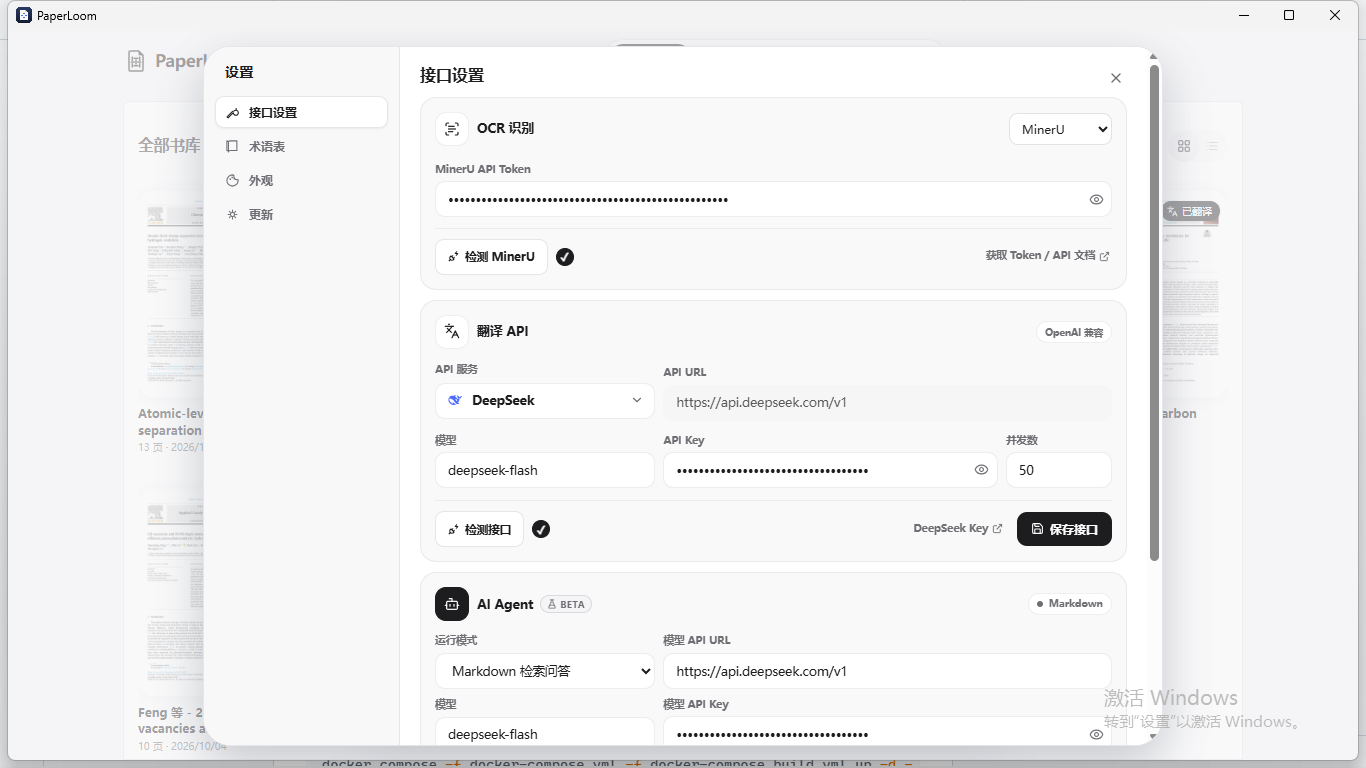
Then add the PDF, or import it from Zotero, start the translation, and watch the progress in the task center. After reading, open the cross-reference reading to check the text, formulas and charts. If necessary, open Markdown or AI Q&A. Finally, export the file on the details page, or select multiple files in the library, save to Obsidian, and write back to Zotero.
Before writing back to Zotero, you must first open the Allow other applications on this PC to communicate with Zotero and leave Zotero on. When writing back for the first time, Zotero will pop up the authorization window. It is recommended to directly select Always allowed, if you select Allow only once, you may be asked again during the subsequent upload stage.
Friends who want to deploy it themselves can also use Docker to build from source code.
Just replace python3 with python on Windows. The first build requires downloading Rust, Python, Node and typesetting-related dependencies, which will take a while, so be patient. Then fill in your own OCR and model API on the page to use it.
Disadvantages
To be honest, PaperLoom is still an early version of 0.1.
As for the OCR and translation model API, it costs money, and the amount and fee are subject to each service provider. PaperLoom itself is open source and free, but it can’t pay the bill for you. It is definitely more convenient and flexible to configure API translation yourself. Here is my experience:Qwen is the cheapest, DeepSeek is the fastest, and OpenAI is the most accurate., this is just the actual measurement in my field.
Another point: both MinerU and PaddleOCR can be used, but when it comes to complex tables and image cropping, the results of the two may be different. Don't just rank them based on the results of one or two documents. It is recommended to go back to the original PDF and take a look at the important formulas, tabular data and figure notes.
The open source license of my project is AGPL-3.0. Each official version will be accompanied by the complete corresponding source code. The RetainPDF part retains the original MIT statement. For those who want to develop it again or deploy it as a service, it is recommended to read the agreement first.
Let me share my development experience
I would like to take this opportunity to talk about my biggest experience in this development.
I mainly used two AIs for this project, Claude Opus and ChatGPT 6.1 Sol. After using them, I found that their strengths and positioning were completely different.
Opus is the employee who best understands what I want.
If you tell it an idea that you haven't fully thought about yet, it will figure out what you really want and then make it. Therefore, I basically leave product research, functional requirements design, and specific implementation to it. Front-end, art, and those abstract needs that are not clearly explained are its strengths.
What about ChatGPT 6.1 Sol?
It is particularly suitable for troubleshooting bugs, fixing bugs, doing security audits, and modifying the backend, because it adheres to the project specifications so much. If you ask it to check problems, it will honestly check the specifications one by one.
But therein lies the problem. It doesn't understand human language very well. If the specifications are clearly written, it will be a good hand. If the specifications are not written well, it will easily go astray.
It is like a stubborn old employee who doesn't have many wild ideas. When encountering areas that are not covered in the specifications, he just follows the existing code and often makes mistakes. Therefore, for tasks entrusted to it, the specifications must be clearly written first.
After this trip, my biggest feeling is that using AI for development is actually a lot like starting a company.
You are the boss, so you don’t have to write every line of code yourself, but you have to know what each of your employees is good at and what their temperament is like. Those who understand the needs will build products and front-end, follow the rules to check bugs, do audits, modify the back-end, and allocate the right work to the right people.
If the division is wrong, no matter how strong the employee is, he will mess up the matter.
The last, the last
Let’s talk about names.
Loom in PaperLoom means loom.
Speaking of looms, there is a story related to it in the history of computers. The Jacquard loom of the early 19th century used punched cards to control the woven patterns. Later, when Babbage designed the Analytical Machine, he borrowed the idea of this set of punched cards. Ada Lovelace once wrote something to the effect that the analytical machine weaves algebraic patterns just as the Jacquard loom weaves flowers and leaves.
I quite like this imagery.
When reading a paper, the original text, translation, annotations, and notes are just scattered threads, one in Zotero, one in the translation tool, and another in Obsidian.
What PaperLoom wants to do is weave these threads onto the same piece of cloth.
The four windows mentioned at the beginning can now finally be harvested into one.
To do this project, on the one hand, I want to solve the trouble of reading the literature and switch to the software myself. On the other hand, I also want to see if anyone else has been tortured by this matter like me. If you encounter problems during use, or if you have any features you want to add, you are welcome to raise an issue on GitHub. If you find it useful, just click on the star, which is the greatest encouragement to me.
There is also a QR code for PaperLoom’s communication group on the warehouse homepage. Interested friends can join the group to chat together.
The above is the introduction of PaperLoom.
I am Sanmu, a college student who loves vibe coding and vibe research. If you are interested, you can click on the homepage and there will be more content waiting for you to unlock.
Ghana~
- Author:Sanmu
- URL:https://luffysite.top/article/paperloom-pdf-translation-zotero-obsidian
- Copyright:All articles in this blog, except for special statements, adopt BY-NC-SA agreement. Please indicate the source!
Relate Posts